Bun 支持 WebKit Inspector Protocol,因此您可以使用交互式调试器调试代码。出于演示目的,考虑以下简单 web 服务器。

调试 JavaScript 和 TypeScript

https://mintcdn.com/teemo/2s-4Z6VdGqiCeBNX/icons/typescript.svg?fit=max&auto=format&n=2s-4Z6VdGqiCeBNX&q=85&s=087b260066909db1cd3e9c7292bc34b2server.ts
Bun.serve({
  fetch(req) {
    console.log(req.url);
    return new Response("Hello, world!");
  },
});

--inspect

要在使用 Bun 运行代码时启用调试,请使用 --inspect 标志。这会自动在可用端口上启动一个 WebSocket 服务器,可用于检查正在运行的 Bun 进程。
terminal
bun --inspect server.ts
------------------ Bun Inspector ------------------
监听地址:
  ws://localhost:6499/0tqxs9exrgrm

在浏览器中检查:
  https://debug.bun.sh/#localhost:6499/0tqxs9exrgrm
------------------ Bun Inspector ------------------

--inspect-brk

--inspect-brk 标志的行为与 --inspect 完全相同,只是它会自动在执行脚本的第一行注入一个断点。这对于调试运行很快并立即退出的脚本很有用。

--inspect-wait

--inspect-wait 标志的行为与 --inspect 完全相同,只是代码在调试器附加到运行进程之前不会执行。

为调试器设置端口或 URL

无论您使用哪个标志,都可以选择指定端口号、URL 前缀或两者都指定。
terminal
bun --inspect=4000 server.ts
bun --inspect=localhost:4000 server.ts
bun --inspect=localhost:4000/prefix server.ts

调试器

各种调试工具可以连接到此服务器以提供交互式调试体验。

debug.bun.sh

Bun 在 debug.bun.sh 托管了一个基于 Web 的调试器。它是 WebKit 的 Web Inspector Interface 的修改版本,对 Safari 用户来说会很熟悉。 在浏览器中打开提供的 debug.bun.sh URL 以启动调试会话。从此界面,您将能够查看正在运行的文件的源代码,查看和设置断点,并使用内置控制台执行代码。
Bun 调试器截图,Console
标签页
让我们设置一个断点。导航到 Sources 标签页;您应该会看到前面的代码。单击第 3 行号以在我们的 console.log(req.url) 语句上设置断点。
Bun 调试器截图
然后在您的 Web 浏览器中访问 http://localhost:3000。这将向我们的 localhost Web 服务器发送 HTTP 请求。看起来页面似乎没有加载。为什么?因为程序已在我们之前设置的断点处暂停执行。 注意 UI 如何发生了变化。
Bun 调试器截图
此时,我们可以做很多事情来检查当前执行环境。我们可以使用底部的控制台在程序的上下文中运行任意代码,完全访问我们断点范围内变量。
Bun 调试器控制台
在 Sources 面板的右侧,我们可以看到当前范围内的所有局部变量,并深入查看它们的属性和方法。在这里,我们正在检查 req 变量。
Bun 调试器变量
在 Sources 面板的左上方,我们可以控制程序的执行。
Bun 调试器控制
这里是解释控制流按钮功能的速查表。
  • 继续脚本执行 — 继续运行程序直到下一个断点或异常。
  • 逐行执行 — 程序将继续到下一行。
  • 步入 — 如果当前语句包含函数调用,调试器将”步入”被调用的函数。
  • 步出 — 如果当前语句是函数调用,调试器将完成调用的执行,然后”步出”函数到调用它的地方。
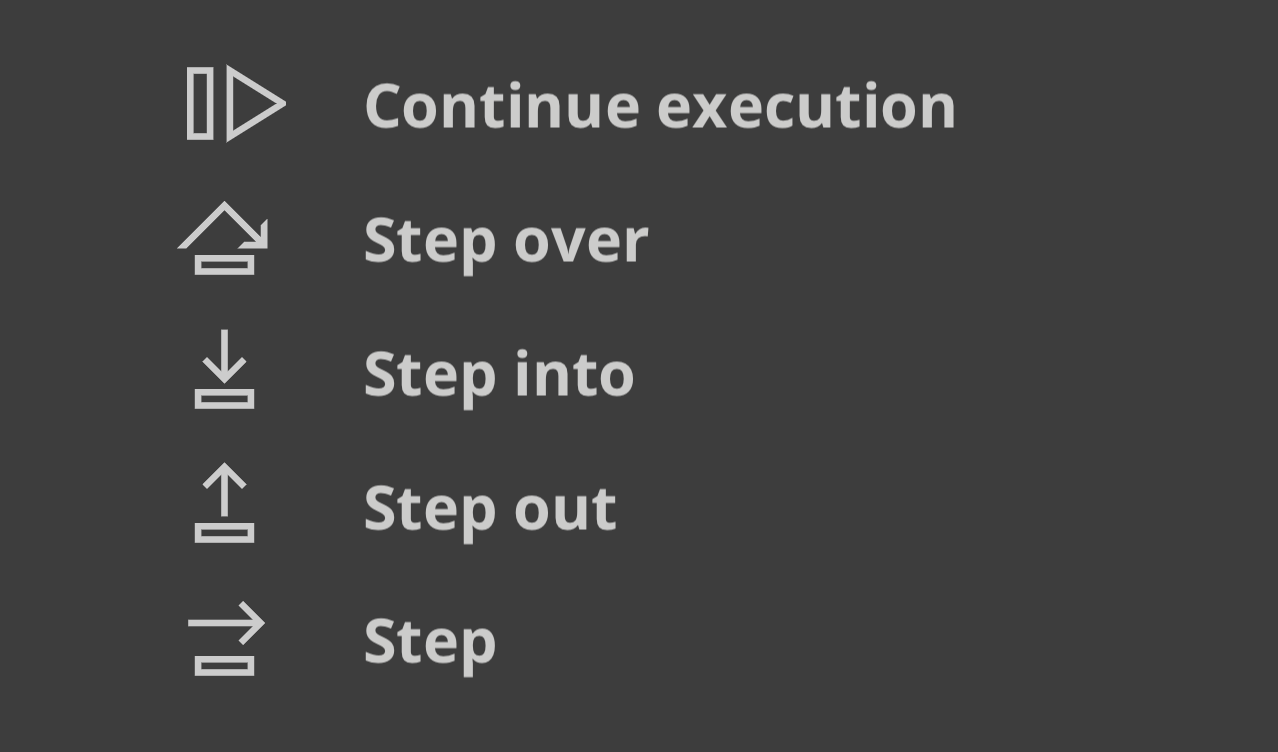
Bun 调试器执行
控制

Visual Studio Code 调试器

Visual Studio Code 中提供了对调试 Bun 脚本的实验性支持。要使用它,您需要安装 Bun VSCode 扩展

调试网络请求

BUN_CONFIG_VERBOSE_FETCH 环境变量可让您自动记录使用 fetch()node:http 进行的网络请求。
描述
curl将请求打印为 curl 命令。
true打印请求和响应信息
false不打印任何内容。默认值

将 fetch 和 node:http 请求打印为 curl 命令

Bun 还支持通过将环境变量 BUN_CONFIG_VERBOSE_FETCH 设置为 curl,将 fetch()node:http 网络请求打印为 curl 命令。这会将 fetch 请求打印为单行 curl 命令,以便您可以复制粘贴到终端中以复现请求。
https://mintcdn.com/teemo/2s-4Z6VdGqiCeBNX/icons/typescript.svg?fit=max&auto=format&n=2s-4Z6VdGqiCeBNX&q=85&s=087b260066909db1cd3e9c7292bc34b2index.ts
process.env.BUN_CONFIG_VERBOSE_FETCH = "curl";

await fetch("https://example.com", {
  method: "POST",
  headers: {
    "Content-Type": "application/json",
  },
  body: JSON.stringify({ foo: "bar" }),
});
[fetch] $ curl --http1.1 "https://example.com/" -X POST -H "content-type: application/json" -H "Connection: keep-alive" -H "User-Agent: Bun/1.3.3" -H "Accept: */*" -H "Host: example.com" -H "Accept-Encoding: gzip, deflate, br" --compressed -H "Content-Length: 13" --data-raw "{\"foo\":\"bar\"}"
[fetch] > HTTP/1.1 POST https://example.com/
[fetch] > content-type: application/json
[fetch] > Connection: keep-alive
[fetch] > User-Agent: Bun/1.3.3
[fetch] > Accept: */*
[fetch] > Host: example.com
[fetch] > Accept-Encoding: gzip, deflate, br
[fetch] > Content-Length: 13

[fetch] < 200 OK
[fetch] < Accept-Ranges: bytes
[fetch] < Cache-Control: max-age=604800
[fetch] < Content-Type: text/html; charset=UTF-8
[fetch] < Date: Tue, 18 Jun 2024 05:12:07 GMT
[fetch] < Etag: "3147526947"
[fetch] < Expires: Tue, 25 Jun 2024 05:12:07 GMT
[fetch] < Last-Modified: Thu, 17 Oct 2019 07:18:26 GMT
[fetch] < Server: EOS (vny/044F)
[fetch] < Content-Length: 1256
带有 [fetch] > 的行是从您的本地代码发出的请求,带有 [fetch] < 的行是来自远程服务器的响应。 BUN_CONFIG_VERBOSE_FETCH 环境变量在 fetch()node:http 请求中都受支持,所以它应该可以直接使用。 要不带 curl 命令打印,请将 BUN_CONFIG_VERBOSE_FETCH 设置为 true
https://mintcdn.com/teemo/2s-4Z6VdGqiCeBNX/icons/typescript.svg?fit=max&auto=format&n=2s-4Z6VdGqiCeBNX&q=85&s=087b260066909db1cd3e9c7292bc34b2index.ts
process.env.BUN_CONFIG_VERBOSE_FETCH = "true";

await fetch("https://example.com", {
  method: "POST",
  headers: {
    "Content-Type": "application/json",
  },
  body: JSON.stringify({ foo: "bar" }),
});
[fetch] > HTTP/1.1 POST https://example.com/
[fetch] > content-type: application/json
[fetch] > Connection: keep-alive
[fetch] > User-Agent: Bun/1.3.3
[fetch] > Accept: */*
[fetch] > Host: example.com
[fetch] > Accept-Encoding: gzip, deflate, br
[fetch] > Content-Length: 13

[fetch] < 200 OK
[fetch] < Accept-Ranges: bytes
[fetch] < Cache-Control: max-age=604800
[fetch] < Content-Type: text/html; charset=UTF-8
[fetch] < Date: Tue, 18 Jun 2024 05:12:07 GMT
[fetch] < Etag: "3147526947"
[fetch] < Expires: Tue, 25 Jun 2024 05:12:07 GMT
[fetch] < Last-Modified: Thu, 17 Oct 2019 07:18:26 GMT
[fetch] < Server: EOS (vny/044F)
[fetch] < Content-Length: 1256

堆栈跟踪和源码映射

Bun 会转译每个文件,这听起来好像意味着您在控制台中看到的堆栈跟踪会无用地指向转译后的输出。为了解决这个问题,Bun 会自动为每个转译的文件生成和提供源码映射文件。当您在控制台中看到堆栈跟踪时,您可以单击文件路径,跳转到原始源代码,即使它是用 TypeScript 或 JSX 编写的,或者应用了一些其他转换。 Bun 在运行时转译文件时以及使用 bun build 预编译文件时都会自动加载源码映射。

语法高亮的源代码预览

为了帮助调试,当发生未处理的异常或拒绝时,Bun 会自动打印一个小的源代码预览。您可以通过调用 Bun.inspect(error) 来模拟这种行为:
// 创建一个错误
const err = new Error("Something went wrong");
console.log(Bun.inspect(err, { colors: true }));
这会打印错误发生位置的语法高亮源代码预览,连同错误消息和堆栈跟踪。
1 | // Create an error
2 | const err = new Error("Something went wrong");
                ^
error: Something went wrong
      at file.js:2:13

V8 堆栈跟踪

Bun 使用 JavaScriptCore 作为其引擎,但生态系统和 npm 的大部分都期望 V8。JavaScript 引擎在 error.stack 格式上有所不同。Bun 旨在成为 Node.js 的直接替代品,这意味着即使引擎不同,堆栈跟踪也应该尽可能相似。 这就是为什么当您在 Bun 中记录 error.stack 时,error.stack 的格式与 Node.js 的 V8 引擎相同。当您使用期望 V8 堆栈跟踪的库时,这尤其有用。

V8 堆栈跟踪 API

Bun 实现了 V8 堆栈跟踪 API,这是一组允许您操作堆栈跟踪的函数。
Error.prepareStackTrace
Error.prepareStackTrace 函数是一个全局函数,可让您自定义堆栈跟踪输出。此函数使用错误对象和 CallSite 对象数组调用,让您返回自定义堆栈跟踪。
Error.prepareStackTrace = (err, stack) => {
  return stack.map(callSite => {
    return callSite.getFileName();
  });
};

const err = new Error("Something went wrong");
console.log(err.stack);
// [ "error.js" ]
CallSite 对象具有以下方法:
方法返回值
getThis函数调用的 this
getTypeNamethis 的类型
getFunction函数对象
getFunctionName函数名字符串
getMethodName方法名字符串
getFileName文件名或 URL
getLineNumber行号
getColumnNumber列号
getEvalOriginundefined
getScriptNameOrSourceURL源 URL
isToplevel如果函数在全局作用域中则返回 true
isEval如果函数是 eval 调用则返回 true
isNative如果函数是原生的则返回 true
isConstructor如果函数是构造函数则返回 true
isAsync如果函数是 async 的则返回 true
isPromiseAll尚未实现。
getPromiseIndex尚未实现。
toString返回调用站点的字符串表示
在某些情况下,Function 对象可能已经被垃圾回收,因此其中一些方法可能会返回 undefined
Error.captureStackTrace(error, startFn)
Error.captureStackTrace 函数允许您在代码中的特定点捕获堆栈跟踪,而不是在抛出错误的点捕获。 当您有回调或异步代码使确定错误来源变得困难时,这可能会有所帮助。Error.captureStackTrace 的第二个参数是您希望堆栈跟踪开始的函数。 例如,下面的代码将使 err.stack 指向调用 fn() 的代码,即使错误是在 myInner 中抛出的。
https://mintcdn.com/teemo/2s-4Z6VdGqiCeBNX/icons/typescript.svg?fit=max&auto=format&n=2s-4Z6VdGqiCeBNX&q=85&s=087b260066909db1cd3e9c7292bc34b2index.ts
const fn = () => {
  function myInner() {
    throw err;
  }

  try {
    myInner();
  } catch (err) {
    console.log(err.stack);
    console.log("");
    console.log("-- captureStackTrace --");
    console.log("");
    Error.captureStackTrace(err, fn);
    console.log(err.stack);
  }
};

fn();
Error: here!
    at myInner (file.js:4:15)
    at fn (file.js:8:5)
    at module code (file.js:17:1)
    at moduleEvaluation (native)
    at moduleEvaluation (native)
    at <anonymous> (native)

-- captureStackTrace --

Error: here!
    at module code (file.js:17:1)
    at moduleEvaluation (native)
    at moduleEvaluation (native)
    at <anonymous> (native)